> ## Documentation Index
> Fetch the complete documentation index at: https://dripart-feat-openapi-i18n.mintlify.site/llms.txt
> Use this file to discover all available pages before exploring further.
# ワークフロー API 形式
> ComfyUI ワークフローの API 形式とそのエクスポート方法
ComfyUI ワークフローは、ノードのグラフを記述する JSON オブジェクトです。Cloud API や自身のサーバーを通じてプログラムから ComfyUI を呼び出す場合、ワークフローは**API 形式**で送信する必要があります。これはブラウザで使用される通常の保存形式とは異なる専用の JSON 構造です。
このページでは、両者の違いとワークフローを正しくエクスポートする方法を説明します。
***
## 保存形式 vs API 形式
ComfyUI フロントエンドは 2 つの形式でワークフローを保存できます:
| | 保存形式 | API 形式 |
| --------------- | -------------------------- | ------------------------------ |
| **メニュー** | `File → Save` または `Ctrl+S` | `File → Export Workflow (API)` |
| **ファイル拡張子** | `.json` | `.json` |
| **ノードキー** | ノードタイトルまたはラベル | 数値ノード ID |
| **ウィジェット値** | 含む | 含む |
| **位置/レイアウトデータ** | 含む (x, y, width) | **含まない** |
| **色/グループ** | 含む | **含まない** |
| **用途** | フロントエンドで再読み込み | API 送信用 |
| **UI に読み込み可能か** | 可 | 可(ただしレイアウトなし) |
重要な違い:**API 形式は UI メタデータを省略**します(位置、色、グループ、ノードサイズ)。これらはフロントエンドでの視覚的編集にのみ必要なためです。これにより JSON がより小さく、プログラムでの使用に適した形になります。
***
## エクスポート方法
ComfyUI フロントエンドでワークフローを開き、`File → Export Workflow (API)` を選択します:
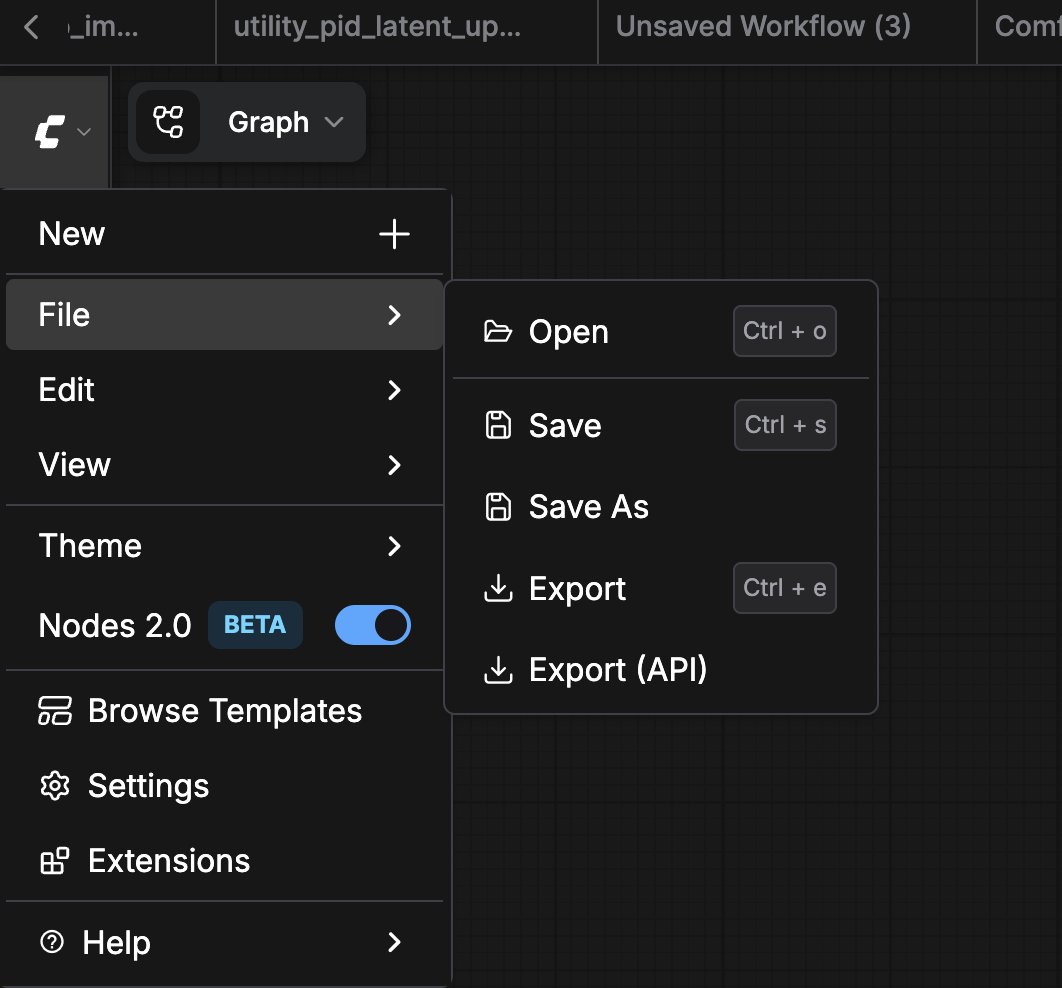 これにより、API 関連データのみを含む `.json` ファイルがダウンロードされます:
```json theme={null}
{
"3": {
"inputs": {
"seed": 156680208700286,
"steps": 20,
"cfg": 8,
"sampler_name": "euler",
"scheduler": "normal",
"denoise": 1,
"model": [
"4",
0
],
"positive": [
"6",
0
],
"negative": [
"7",
0
],
"latent_image": [
"5",
0
]
},
"class_type": "KSampler",
"_meta": {
"title": "KSampler"
}
},
"4": {
"inputs": {
"ckpt_name": "v1-5-pruned-emaonly-fp16.safetensors"
},
"class_type": "CheckpointLoaderSimple",
"_meta": {
"title": "Load Checkpoint"
}
},
"5": {
"inputs": {
"width": 512,
"height": 512,
"batch_size": 1
},
"class_type": "EmptyLatentImage",
"_meta": {
"title": "Empty Latent Image"
}
},
"6": {
"inputs": {
"text": "beautiful scenery nature glass bottle landscape, , purple galaxy bottle,",
"clip": [
"4",
1
]
},
"class_type": "CLIPTextEncode",
"_meta": {
"title": "CLIP Text Encode (Prompt)"
}
},
"7": {
"inputs": {
"text": "text, watermark",
"clip": [
"4",
1
]
},
"class_type": "CLIPTextEncode",
"_meta": {
"title": "CLIP Text Encode (Prompt)"
}
},
"8": {
"inputs": {
"samples": [
"3",
0
],
"vae": [
"4",
2
]
},
"class_type": "VAEDecode",
"_meta": {
"title": "VAE Decode"
}
},
"9": {
"inputs": {
"filename_prefix": "ComfyUI",
"images": [
"8",
0
]
},
"class_type": "SaveImage",
"_meta": {
"title": "Save Image"
}
}
}
```
***
## 形式の変換
保存形式のワークフローを API 形式に変換する最も簡単な方法:
1. フロントエンドで `File → Load` から `.json` ファイルを開く
2. `File → Export Workflow (API)` で再エクスポート
自動化が必要な場合は、各ノードの `x`、`y`、`width` フィールドを削除し、ルート JSON から `groups` と `extra` セクションを取り除くスクリプトを作成できます。
***
## 関連ページ
* [API 概要](/ja/development/api-development/overview) — Cloud と Server API の比較
* [Cloud API 概要](/ja/development/cloud/overview) — Comfy Cloud に API 形式のワークフローを送信
* [API 例](/ja/development/comfyui-server/api-examples) — API 形式ワークフローの実例
* [API Key の取得](/ja/development/api-development/getting-an-api-key) — Cloud API と Partner Nodes に必要
これにより、API 関連データのみを含む `.json` ファイルがダウンロードされます:
```json theme={null}
{
"3": {
"inputs": {
"seed": 156680208700286,
"steps": 20,
"cfg": 8,
"sampler_name": "euler",
"scheduler": "normal",
"denoise": 1,
"model": [
"4",
0
],
"positive": [
"6",
0
],
"negative": [
"7",
0
],
"latent_image": [
"5",
0
]
},
"class_type": "KSampler",
"_meta": {
"title": "KSampler"
}
},
"4": {
"inputs": {
"ckpt_name": "v1-5-pruned-emaonly-fp16.safetensors"
},
"class_type": "CheckpointLoaderSimple",
"_meta": {
"title": "Load Checkpoint"
}
},
"5": {
"inputs": {
"width": 512,
"height": 512,
"batch_size": 1
},
"class_type": "EmptyLatentImage",
"_meta": {
"title": "Empty Latent Image"
}
},
"6": {
"inputs": {
"text": "beautiful scenery nature glass bottle landscape, , purple galaxy bottle,",
"clip": [
"4",
1
]
},
"class_type": "CLIPTextEncode",
"_meta": {
"title": "CLIP Text Encode (Prompt)"
}
},
"7": {
"inputs": {
"text": "text, watermark",
"clip": [
"4",
1
]
},
"class_type": "CLIPTextEncode",
"_meta": {
"title": "CLIP Text Encode (Prompt)"
}
},
"8": {
"inputs": {
"samples": [
"3",
0
],
"vae": [
"4",
2
]
},
"class_type": "VAEDecode",
"_meta": {
"title": "VAE Decode"
}
},
"9": {
"inputs": {
"filename_prefix": "ComfyUI",
"images": [
"8",
0
]
},
"class_type": "SaveImage",
"_meta": {
"title": "Save Image"
}
}
}
```
***
## 形式の変換
保存形式のワークフローを API 形式に変換する最も簡単な方法:
1. フロントエンドで `File → Load` から `.json` ファイルを開く
2. `File → Export Workflow (API)` で再エクスポート
自動化が必要な場合は、各ノードの `x`、`y`、`width` フィールドを削除し、ルート JSON から `groups` と `extra` セクションを取り除くスクリプトを作成できます。
***
## 関連ページ
* [API 概要](/ja/development/api-development/overview) — Cloud と Server API の比較
* [Cloud API 概要](/ja/development/cloud/overview) — Comfy Cloud に API 形式のワークフローを送信
* [API 例](/ja/development/comfyui-server/api-examples) — API 形式ワークフローの実例
* [API Key の取得](/ja/development/api-development/getting-an-api-key) — Cloud API と Partner Nodes に必要