> ## Documentation Index
> Fetch the complete documentation index at: https://dripart-feat-openapi-i18n.mintlify.site/llms.txt
> Use this file to discover all available pages before exploring further.
# ComfyUI Depth Anything 3 Examples
> Learn how to use Depth Anything 3 in ComfyUI for monocular and multi-view depth estimation from images and videos, powered by ByteDance Seed's vision transformer.
# ComfyUI Depth Anything 3 Introduction
[Depth Anything 3 (DA3)](https://github.com/ByteDance-Seed/Depth-Anything-3), from ByteDance Seed, is a vision transformer that recovers spatially consistent geometry from arbitrary visual inputs, with or without known camera poses. A single plain DINO encoder and unified depth-ray representation let one model family cover monocular depth, multi-view depth, camera pose estimation, and 3D reconstruction.
Key capabilities:
* **Unified monocular & multi-view depth**: estimate depth from a single image or multiple views
* **Camera pose estimation**: recover camera positions from unordered image sets
* **3D reconstruction** from multi-view inputs
* **Video depth estimation**: per-frame depth sequences for video inputs
* **Multiple model variants**: Small, Base, Mono/Metric Large
Make sure your ComfyUI is updated.
* [Download ComfyUI](https://www.comfy.org/download)
* [Update Guide](/installation/update_comfyui)
Workflows in this guide can be found in the [Workflow Templates](/interface/features/template).
If you can't find them in the template, your ComfyUI may be outdated. (Desktop version's update will delay sometime)
If nodes are missing when loading a workflow, possible reasons:
1. You are not using the latest ComfyUI version (Nightly version)
2. Some nodes failed to import at startup
* The Desktop is base on ComfyUI stable release, it will auto-update when there is a new Desktop stable release available.
* [Cloud](https://cloud.comfy.org) will update after ComfyUI stable release.
So, if you find any core node missing in this document, it might be because the new core nodes have not yet been released in the latest stable version. Please wait for the next stable release.
ComfyUI now natively supports Depth Anything 3 nodes. Make sure you have updated to the latest version of [ComfyUI](https://github.com/Comfy-Org/ComfyUI) before starting.
## Model Installation
Download the Depth Anything 3 checkpoint(s) and save them to the corresponding ComfyUI folder:
* **Small** ([depth\_anything\_3\_small.safetensors](https://huggingface.co/Comfy-Org/Depth-Anything-3/resolve/main/geometry_estimation/depth_anything_3_small.safetensors)) — Lightweight, fast inference
* **Base** ([depth\_anything\_3\_base.safetensors](https://huggingface.co/Comfy-Org/Depth-Anything-3/resolve/main/geometry_estimation/depth_anything_3_base.safetensors)) — Balanced performance
* **Mono-Large** ([depth\_anything\_3\_mono\_large.safetensors](https://huggingface.co/Comfy-Org/Depth-Anything-3/resolve/main/geometry_estimation/depth_anything_3_mono_large.safetensors)) — Best for monocular depth, includes sky detection
* **Metric-Large** ([depth\_anything\_3\_metric\_large.safetensors](https://huggingface.co/Comfy-Org/Depth-Anything-3/resolve/main/geometry_estimation/depth_anything_3_metric_large.safetensors)) — Metric scale depth in metres, includes sky detection
```
ComfyUI/
├── models/
│ ├── geometry_estimation/
│ │ ├── depth_anything_3_small.safetensors
│ │ ├── depth_anything_3_base.safetensors
│ │ ├── depth_anything_3_mono_large.safetensors
│ │ └── depth_anything_3_metric_large.safetensors
```
## Example Workflows
***
## 1. Image Depth Estimation
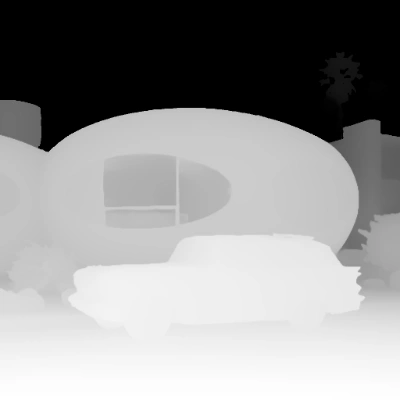
**What it does:** Upload one image and run **Image Depth Estimation (Depth Anything 3)** to produce a depth map. The result is shown in **Depth Preview**, with a side-by-side comparison view of the original image and depth output.
Download JSON or search "Depth Anything 3" in Template Library
Get the example input image for this workflow
### Steps to Run
1. **LoadImage** — load your input image
2. **LoadDA3Model** — select a Depth Anything 3 variant
3. **Run** — click Queue or use `Cmd+Enter`
4. The workflow outputs a depth map and side-by-side comparison
This workflow uses Subgraph nodes for modular processing. Check out the Subgraph documentation to learn how to customize and extend the workflow.
***
## 2. Video Depth Estimation
**What it does:** Upload a video and run **Video Depth Estimation (Depth Anything 3)** to produce a per-frame depth sequence. Inside the subgraph, **GetVideoComponents** splits the input video into frames, **LoadDA3Model** loads the model, and **SetVideoComponents** reassembles the depth frames back into a video output.
Download JSON or search "Depth Anything 3" in Template Library
Open in Comfy Cloud

### Steps to Run
1. **LoadVideo** — load your input video
2. **Select Model** — choose between **Small**, **Base**, **Mono-Large**, or **Metric-Large**
3. **Run** — click Queue or use `Cmd+Enter`
4. The workflow outputs a video with per-frame depth maps
This workflow uses Subgraph nodes for modular processing. Check out the Subgraph documentation to learn how to customize and extend the workflow.
***
## Model Variants
| Variant | head\_type | has\_sky | has\_confidence | camera\_decoder | Best for |
| ---------------- | ---------- | :------: | :-------------: | :-------------: | ---------------------------------- |
| **Small** | dualdpt | ❌ | ✅ | ✅ | Fast inference, mobile/edge |
| **Base** | dualdpt | ❌ | ✅ | ✅ | Balanced performance |
| **Mono-Large** | dpt | ✅ | ❌ | ❌ | Monocular depth with sky detection |
| **Metric-Large** | dpt | ✅ | ❌ | ❌ | Physical metric depth in metres |
* **Small** and **Base** use the `dualdpt` head type with confidence estimation and camera decoder support for multi-view applications.
* **Mono-Large** and **Metric-Large** use the `dpt` head type with sky detection. Metric-Large outputs raw depth in metres.
## Community Resources
* [Depth Anything 3 GitHub (ByteDance-Seed)](https://github.com/ByteDance-Seed/Depth-Anything-3) — Research paper and code
* [Comfy-Org/Depth-Anything-3](https://huggingface.co/Comfy-Org/Depth-Anything-3) — Official ComfyUI model weights