> ## Documentation Index
> Fetch the complete documentation index at: https://dripart-feat-openapi-i18n.mintlify.site/llms.txt
> Use this file to discover all available pages before exploring further.
# 工作流 API 格式
> 理解 ComfyUI 工作流的 API 格式以及如何导出
ComfyUI 工作流是描述节点图的 JSON 对象。当你通过 Cloud API 或自建服务器以编程方式调用 ComfyUI 时,工作流必须以 **API 格式**提交——这是一种与浏览器中使用的常规保存格式不同的专用 JSON 结构。
本页解释两者的区别以及如何正确导出你的工作流。
***
## 保存格式 vs API 格式
ComfyUI 前端可以以两种格式保存工作流:
| | 保存格式 | API 格式 |
| ------------ | -------------------- | ------------------ |
| **菜单路径** | `文件 → 保存` 或 `Ctrl+S` | `文件 → 导出工作流 (API)` |
| **文件后缀** | `.json` | `.json` |
| **节点键** | 节点标题或标签 | 数字节点 ID |
| **组件值** | 包含 | 包含 |
| **位置/布局数据** | 包含 (x, y, width) | **不包含** |
| **颜色/分组** | 包含 | **不包含** |
| **用途** | 在前端重新打开 | API 提交 |
| **可否加载到 UI** | 可以 | 可以,但没有布局 |
关键区别:**API 格式省略了 UI 元数据**(位置、颜色、分组、节点尺寸),这些仅在前端可视化编辑时需要。这使 JSON 更小、更简洁,适合程序化使用。
***
## 如何导出
在 ComfyUI 前端打开工作流,然后导航到 `文件 → 导出工作流 (API)`:
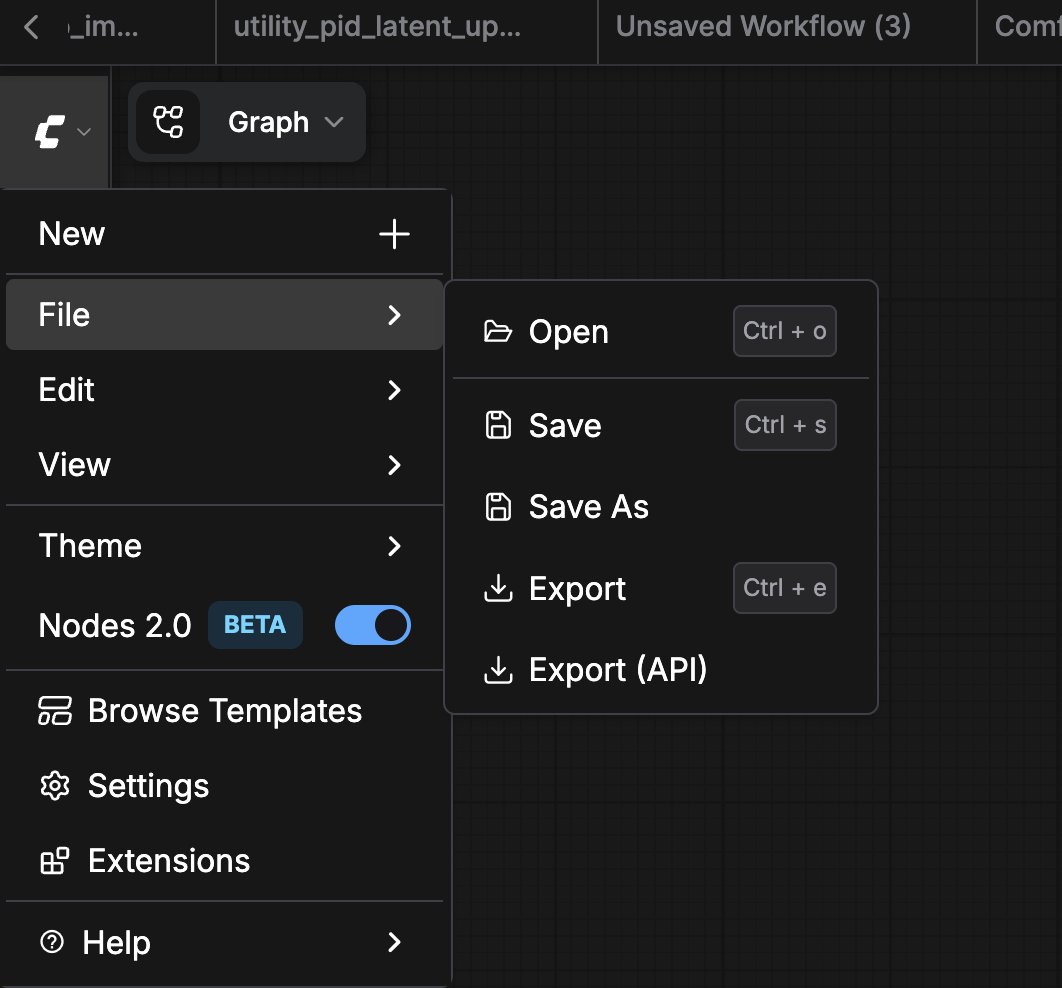 这将下载一个只包含 API 相关数据的 `.json` 文件:
```json theme={null}
{
"3": {
"inputs": {
"seed": 156680208700286,
"steps": 20,
"cfg": 8,
"sampler_name": "euler",
"scheduler": "normal",
"denoise": 1,
"model": [
"4",
0
],
"positive": [
"6",
0
],
"negative": [
"7",
0
],
"latent_image": [
"5",
0
]
},
"class_type": "KSampler",
"_meta": {
"title": "KSampler"
}
},
"4": {
"inputs": {
"ckpt_name": "v1-5-pruned-emaonly-fp16.safetensors"
},
"class_type": "CheckpointLoaderSimple",
"_meta": {
"title": "Load Checkpoint"
}
},
"5": {
"inputs": {
"width": 512,
"height": 512,
"batch_size": 1
},
"class_type": "EmptyLatentImage",
"_meta": {
"title": "Empty Latent Image"
}
},
"6": {
"inputs": {
"text": "beautiful scenery nature glass bottle landscape, , purple galaxy bottle,",
"clip": [
"4",
1
]
},
"class_type": "CLIPTextEncode",
"_meta": {
"title": "CLIP Text Encode (Prompt)"
}
},
"7": {
"inputs": {
"text": "text, watermark",
"clip": [
"4",
1
]
},
"class_type": "CLIPTextEncode",
"_meta": {
"title": "CLIP Text Encode (Prompt)"
}
},
"8": {
"inputs": {
"samples": [
"3",
0
],
"vae": [
"4",
2
]
},
"class_type": "VAEDecode",
"_meta": {
"title": "VAE Decode"
}
},
"9": {
"inputs": {
"filename_prefix": "ComfyUI",
"images": [
"8",
0
]
},
"class_type": "SaveImage",
"_meta": {
"title": "Save Image"
}
}
}
```
***
## 格式转换
如果你有一个保存格式的工作流需要转为 API 格式,最简单的方法是:
1. 在前端通过 `文件 → 加载` 打开 `.json` 文件
2. 通过 `文件 → 导出工作流 (API)` 重新导出
如果需要自动化转换,可以编写脚本去除每个节点的 `x`、`y`、`width` 字段,并移除根 JSON 中的 `groups` 和 `extra` 部分。
***
## 相关页面
* [API 总览](/zh/development/api-development/overview) — 比较 Cloud 和 Server API 选项
* [Cloud API 概述](/zh/development/cloud/overview) — 向 Comfy Cloud 提交 API 格式的工作流
* [API 示例](/zh/development/comfyui-server/api-examples) — 查看 API 格式工作流的使用示例
* [获取 API Key](/zh/development/api-development/getting-an-api-key) — Cloud API 和 Partner Nodes 所需
这将下载一个只包含 API 相关数据的 `.json` 文件:
```json theme={null}
{
"3": {
"inputs": {
"seed": 156680208700286,
"steps": 20,
"cfg": 8,
"sampler_name": "euler",
"scheduler": "normal",
"denoise": 1,
"model": [
"4",
0
],
"positive": [
"6",
0
],
"negative": [
"7",
0
],
"latent_image": [
"5",
0
]
},
"class_type": "KSampler",
"_meta": {
"title": "KSampler"
}
},
"4": {
"inputs": {
"ckpt_name": "v1-5-pruned-emaonly-fp16.safetensors"
},
"class_type": "CheckpointLoaderSimple",
"_meta": {
"title": "Load Checkpoint"
}
},
"5": {
"inputs": {
"width": 512,
"height": 512,
"batch_size": 1
},
"class_type": "EmptyLatentImage",
"_meta": {
"title": "Empty Latent Image"
}
},
"6": {
"inputs": {
"text": "beautiful scenery nature glass bottle landscape, , purple galaxy bottle,",
"clip": [
"4",
1
]
},
"class_type": "CLIPTextEncode",
"_meta": {
"title": "CLIP Text Encode (Prompt)"
}
},
"7": {
"inputs": {
"text": "text, watermark",
"clip": [
"4",
1
]
},
"class_type": "CLIPTextEncode",
"_meta": {
"title": "CLIP Text Encode (Prompt)"
}
},
"8": {
"inputs": {
"samples": [
"3",
0
],
"vae": [
"4",
2
]
},
"class_type": "VAEDecode",
"_meta": {
"title": "VAE Decode"
}
},
"9": {
"inputs": {
"filename_prefix": "ComfyUI",
"images": [
"8",
0
]
},
"class_type": "SaveImage",
"_meta": {
"title": "Save Image"
}
}
}
```
***
## 格式转换
如果你有一个保存格式的工作流需要转为 API 格式,最简单的方法是:
1. 在前端通过 `文件 → 加载` 打开 `.json` 文件
2. 通过 `文件 → 导出工作流 (API)` 重新导出
如果需要自动化转换,可以编写脚本去除每个节点的 `x`、`y`、`width` 字段,并移除根 JSON 中的 `groups` 和 `extra` 部分。
***
## 相关页面
* [API 总览](/zh/development/api-development/overview) — 比较 Cloud 和 Server API 选项
* [Cloud API 概述](/zh/development/cloud/overview) — 向 Comfy Cloud 提交 API 格式的工作流
* [API 示例](/zh/development/comfyui-server/api-examples) — 查看 API 格式工作流的使用示例
* [获取 API Key](/zh/development/api-development/getting-an-api-key) — Cloud API 和 Partner Nodes 所需